OpenAI Codex: Features and Practical Usage Guide
Official documentation refresh — August 19, 2026. This guide includes the material ChatGPT and Codex updates published in the official August 10–18, 2026 update window. The canonical pages now resolve underlearn.chatgpt.com/docs/codex; thedevelopers.openai.com/codex/...links in this guide remain supported entry points. Product availability, entitlement, pricing, and the model selector vary by account and surface, so verify them in your current Codex UI before relying on them.
Current official updates (August 10-18, 2026)
The official Codex manual and ChatGPT & Codex changelog record the following recent changes. Treat these as dated product notes, not permanent guarantees:
- Codex CLI 0.148.0: the August 18 release adds
/exportfor Markdown conversation export,codex exec fork, session archive and restore in the resume picker, prompt drafting during TUI startup, estimated thread credits or cost in/status, built-in Amazon Bedrock Runtime routing, and asynchronous hooks that can invoke MCP tools. It also improves session recovery, MCP reconnection, transcript rendering, and fail-closed sandbox behavior. See the ChatGPT & Codex changelog and Codex CLI release. - ChatGPT desktop context: Computer History creates a searchable timeline and memories only when enabled, with controls to pause, review, or delete history. The current availability note is for the macOS desktop app and excludes the European Union, Switzerland, and the United Kingdom at initial rollout. The Linux desktop app is in preview, and ChatGPT desktop can import supported setup, skills, plugins, projects, and recent work from Claude Code or Cursor. See Computer History, the Linux desktop app, and import instructions.
- ChatGPT Voice and project files: Voice conversations can now work with uploaded files and ChatGPT Projects, so users can discuss a document or continue a project in a voice session. Check the Voice documentation and Projects documentation for the current surface and access boundary.
- Library, search, and paste: on the web, saved Library files can be added to a conversation without uploading again, and search can match folders and conversation titles across web, iOS, and Android. Pasted content longer than 10,000 characters becomes an attachment on every ChatGPT plan; use Show in text field when you need to move it back into the composer. See the ChatGPT release notes.
- GPT-5.6 in ChatGPT: Plus and Pro users can adjust how much thought GPT-5.6 Sol puts into a response. GPT-5.6 Luna is the default ChatGPT model on Free and Go plans. These changes apply to ChatGPT conversations and do not change model behavior in ChatGPT Work or Codex; verify the model picker and entitlement for the account in use. See the ChatGPT release notes.
- ChatGPT Work usage: eligible personal-plan users and ChatGPT Business users can see remaining ChatGPT Work usage in the web sidebar. Work and Codex continue to share usage limits and credits, while available options depend on account and workspace permissions. See pricing and usage.
- Education plugins: College Student, College Educator, and K-12 Educator plugins add study, teaching, lesson-planning, and assessment workflows to ChatGPT Work and Codex. They are available through ChatGPT Edu and ChatGPT for Teachers district deployments, subject to school-controlled tools and permissions. See the plugins documentation.
- Security workflows: hosted Codex Security releases add live progress, measured token usage, resumable deep scans, discovery limits, and repository scan authentication options. Codex Security Review can analyze pull requests for eligible customers, but access and release versions are separate from the main Codex CLI. Check the Security plugin changelog, Security Review, and Security CLI before relying on a specific feature.
1. What Codex Is
Codex is OpenAI's coding agent for software development. It can read a codebase, edit files, run commands, inspect tool output, review diffs, debug failures, and call configured tools when needed.
Think of Codex as a development teammate that works best when the task is scoped and verifiable. Give it the goal, context, constraints, and done criteria; then ask it to implement, test, and summarize what changed.
2. What Codex Can Help With
Codex is useful for:
- Writing features that follow existing project patterns.
- Explaining unfamiliar or legacy codebases.
- Debugging failures from logs, stack traces, tests, or reproducible steps.
- Adding unit, integration, and regression tests.
- Reviewing local diffs or pull requests.
- Running repetitive workflows such as migrations, refactors, changelog updates, and project setup.
- Generating or reviewing non-code artifacts such as PDFs, spreadsheets, documents, and presentations in the Codex App.
Best results usually come from tasks that can be checked with a command, test, screenshot, or review step.
3. Choose the Right Surface
| Surface | Best for | Strengths | Notes |
|---|---|---|---|
| Codex desktop app | Desktop work, multiple threads, visual review, worktrees, and automations | Rich UI, Git tools, terminal, browser preview, and artifact viewer | The current official docs describe the ChatGPT desktop app as Codex; feature access varies by platform and account |
| CLI | Terminal-first work, remote machines, scripts, CI-like workflows | Fast, composable, supports codex exec | Mention paths explicitly |
| IDE Extension | Editor-attached work | Open files and selected code become context | Great for short feedback loops |
| Cloud | Parallel or async hosted tasks | Offloads long work | Requires GitHub and a cloud environment |
| GitHub | Pull request review and fixes | @codex review, @codex fix... | Requires Codex cloud and review setup |
| Slack / Linear | Delegating from collaboration tools | Starts cloud tasks from existing context | Requires connectors and environments |
Quick rule:
- Coding in an editor: use the IDE Extension or Codex App.
- Working from a terminal: use CLI.
- Running long or parallel work: use Cloud or App worktrees.
- Reviewing a PR: use GitHub integration or local
/review. - Repeating a workflow: turn it into a Skill or Plugin.
4. Interface Tour
Codex App
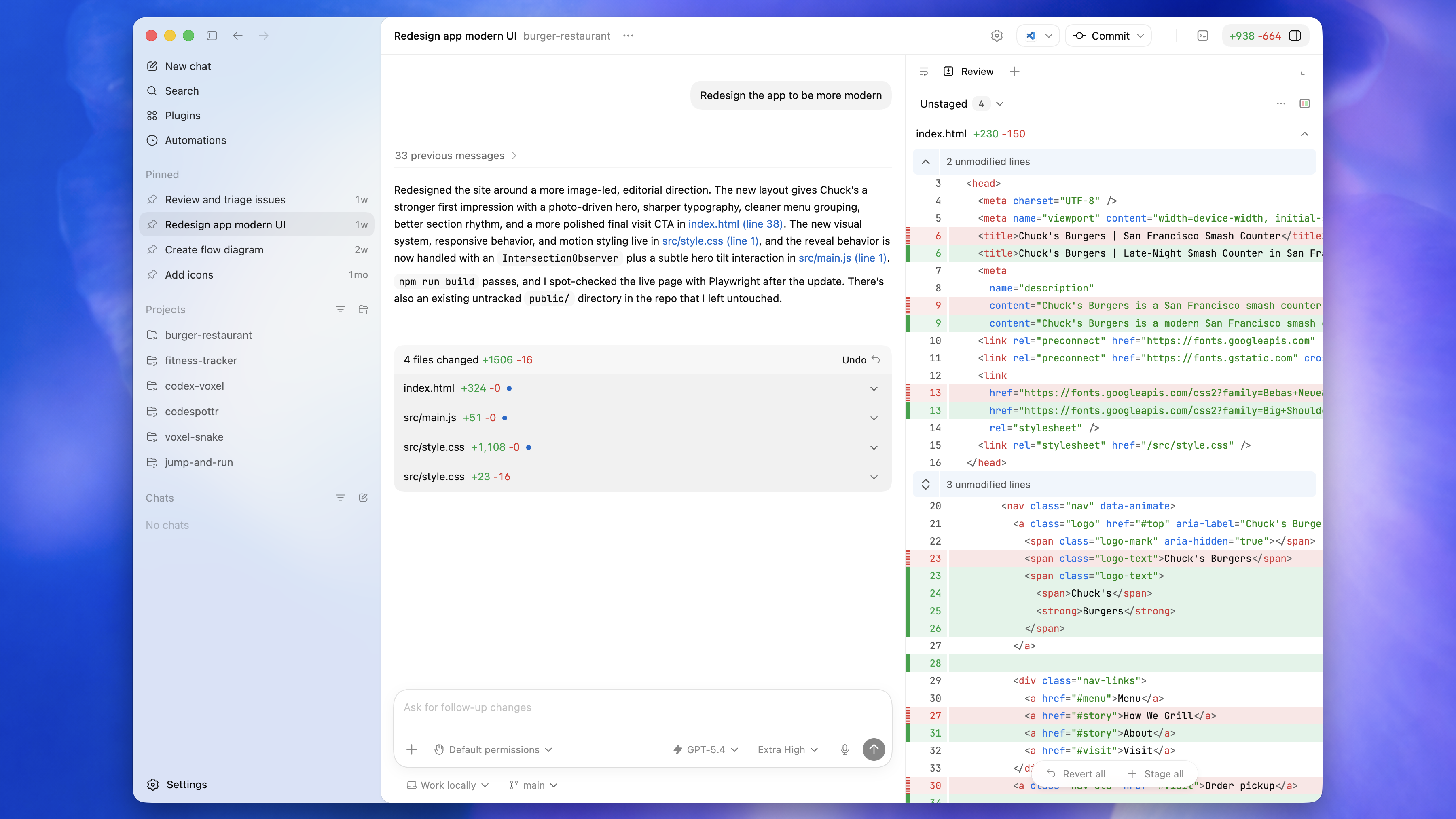
The Codex desktop app is the local workspace for threads, diffs, reviews, Git actions, local terminals, worktrees, automations, browser preview, and artifacts. Treat individual capabilities as version- and account-dependent; verify them in the app before making them part of a team workflow.
Codex CLI
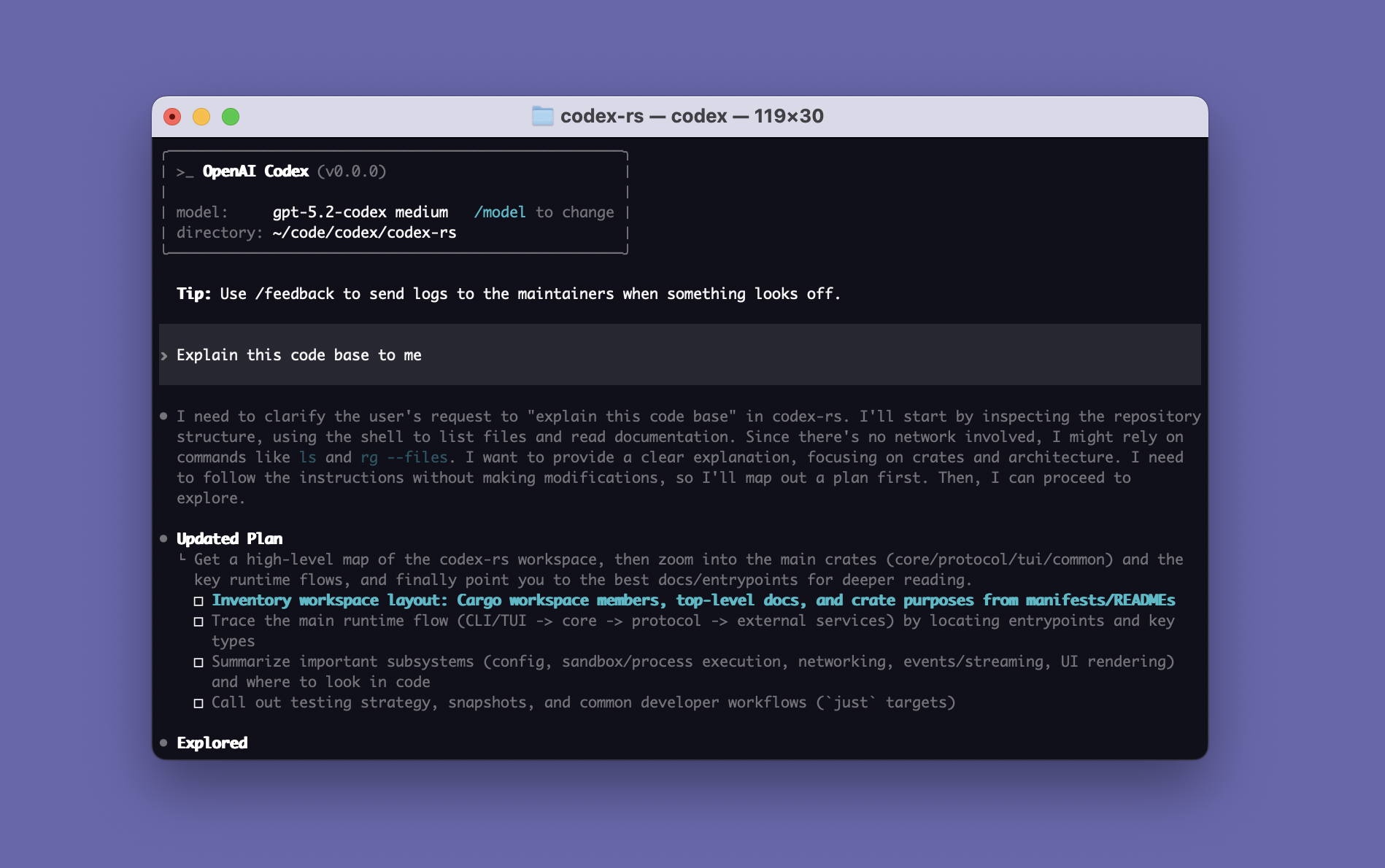
The CLI runs Codex in the terminal. Use it interactively with codex or non-interactively with codex exec.
IDE Extension
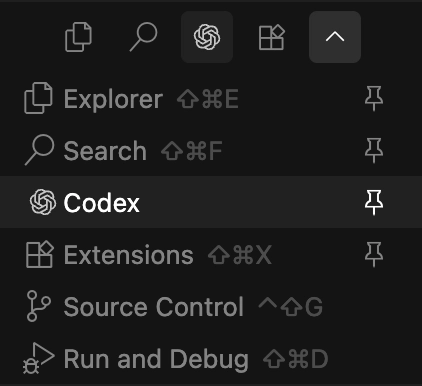
The IDE Extension brings Codex into VS Code-compatible editors. It can use open files, selected code, and editor context.
In-app Browser
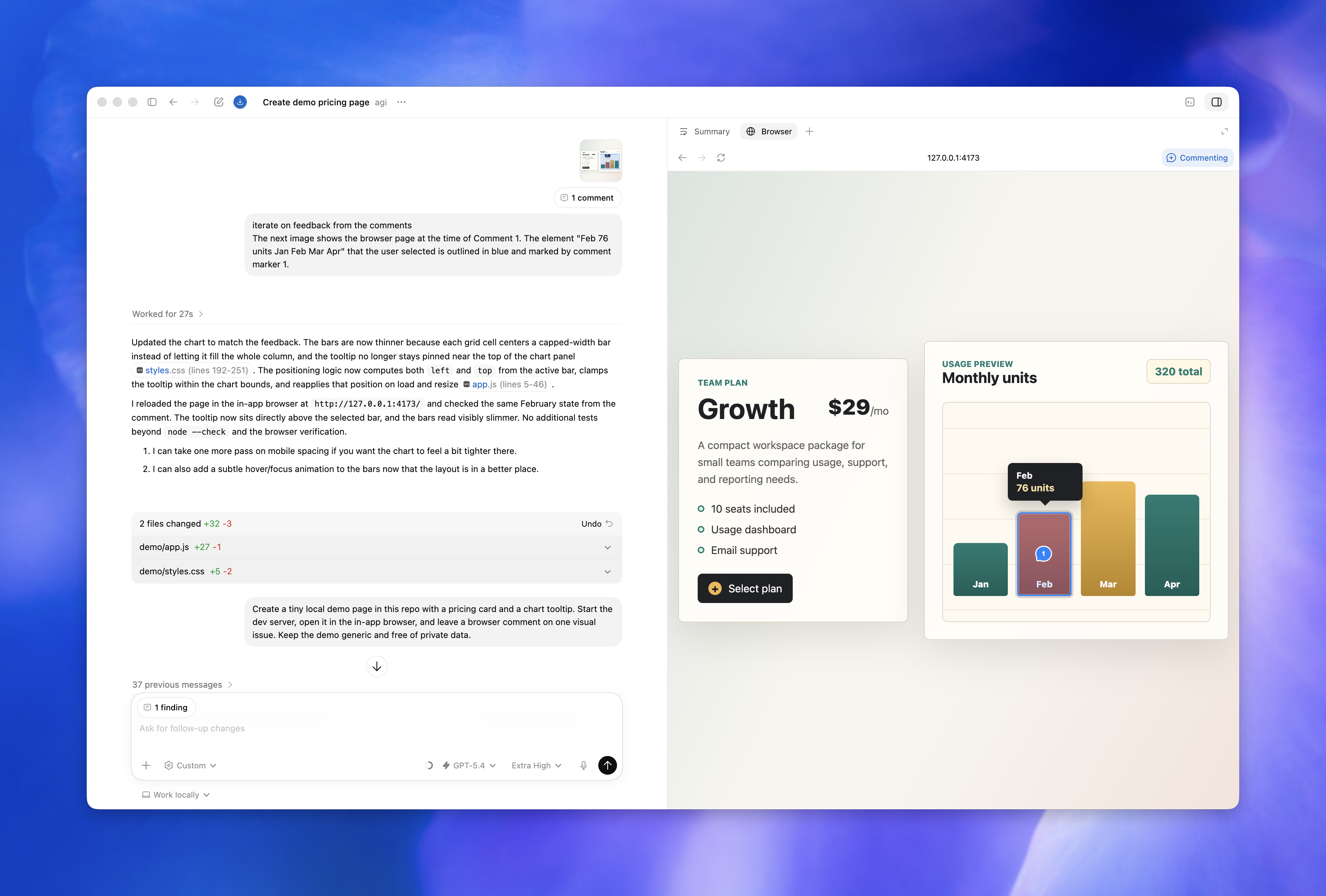
The in-app browser previews local development servers, file-backed previews, and public pages that do not require sign-in.
Browser Comments
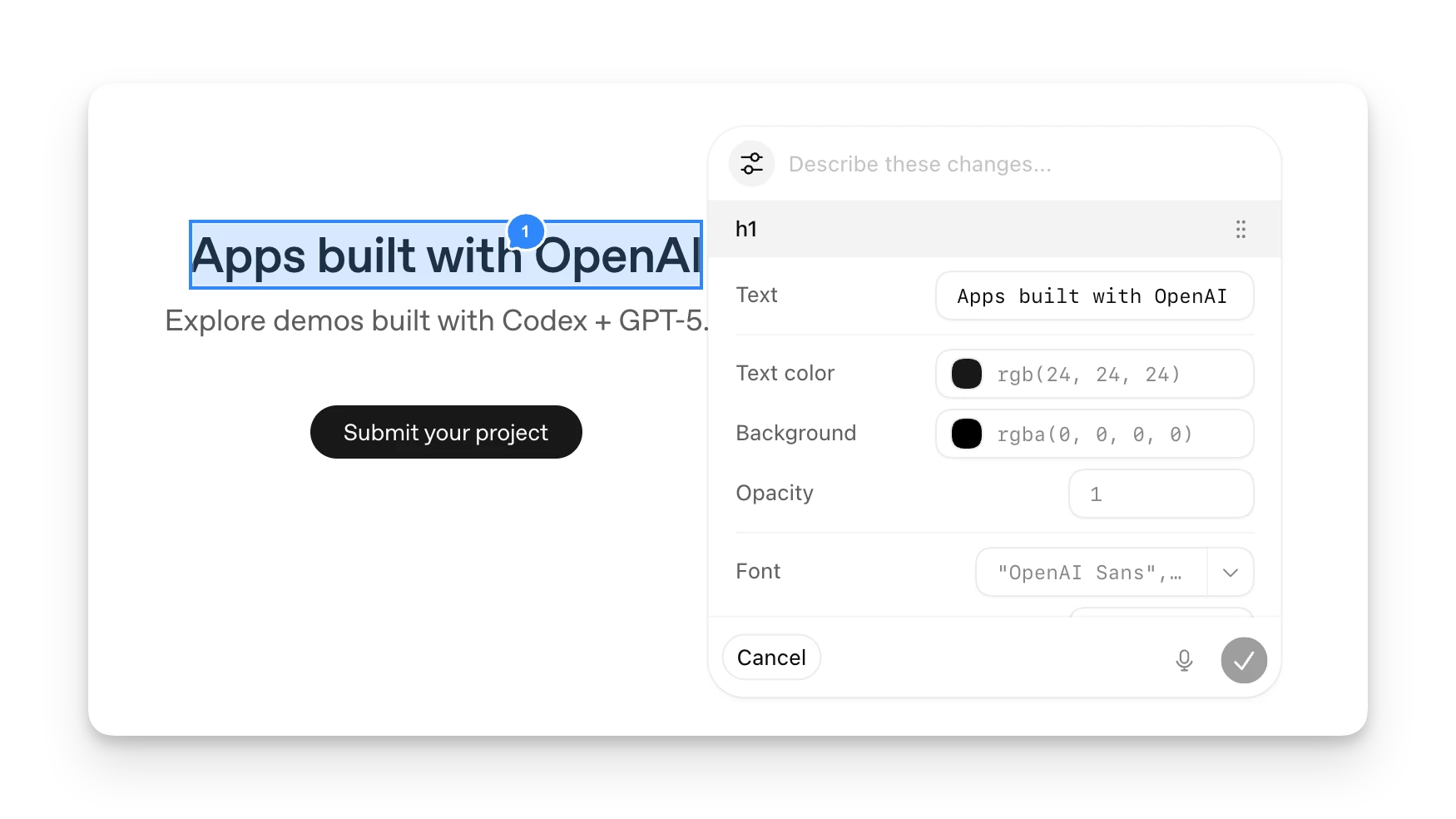
Browser comments let you mark a page region and ask Codex to address that exact visual feedback.
Artifact Viewer
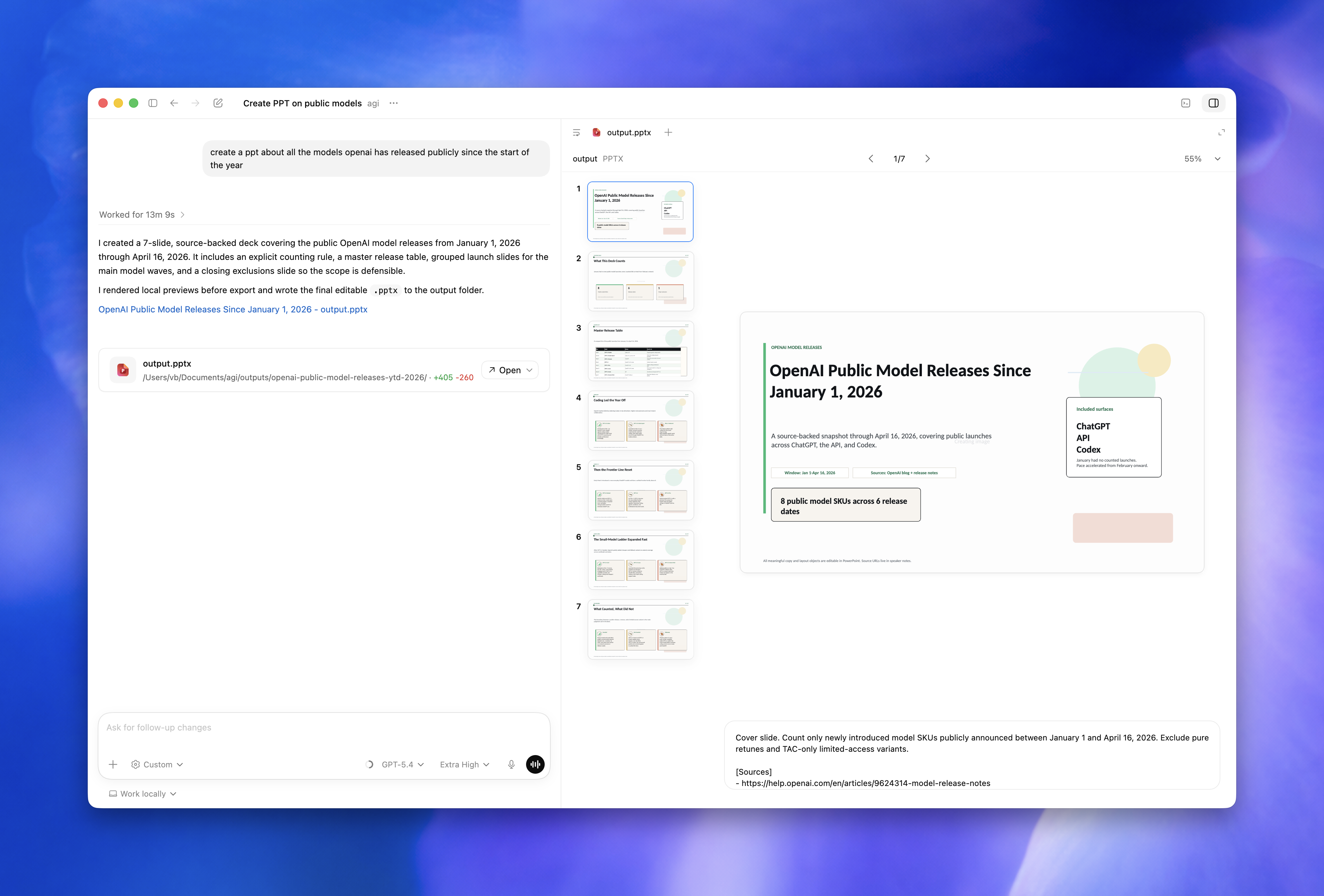
The Codex App can preview non-code artifacts such as documents, spreadsheets, presentations, and PDFs.
Automations
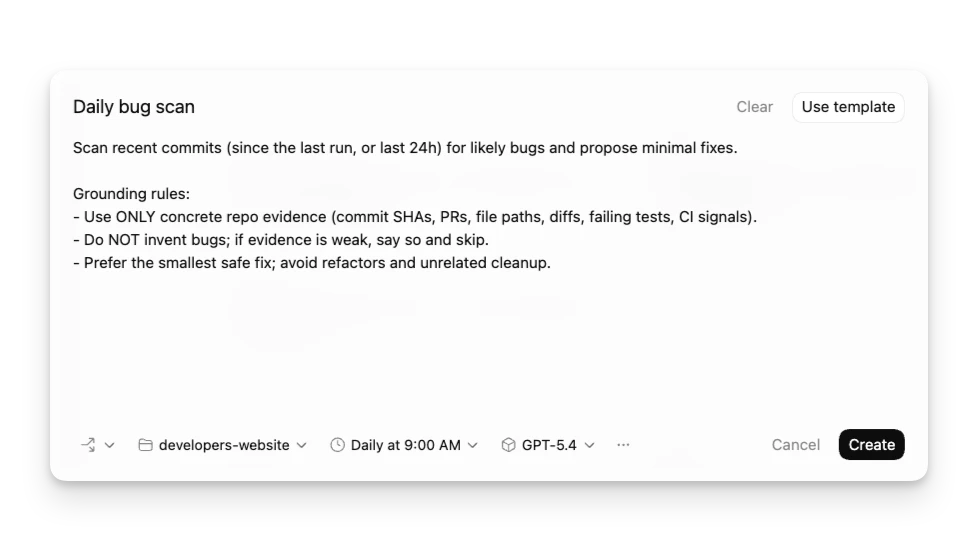
Automations can run scheduled checks, reminders, monitors, or recurring follow-up tasks.
Floating Pop-out
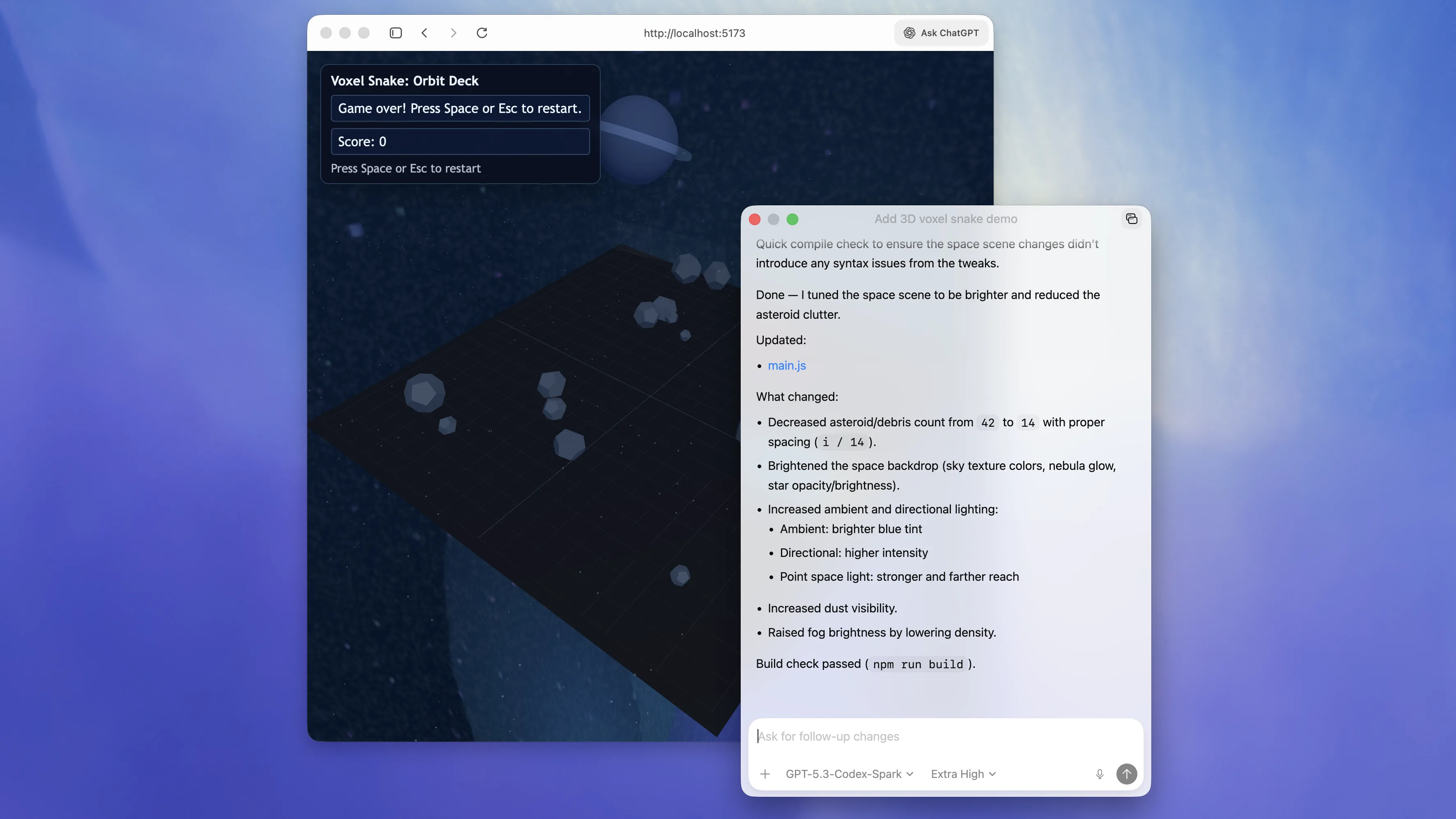
The floating pop-out keeps an active thread visible next to your browser, editor, or preview window.
Browser Developer Mode
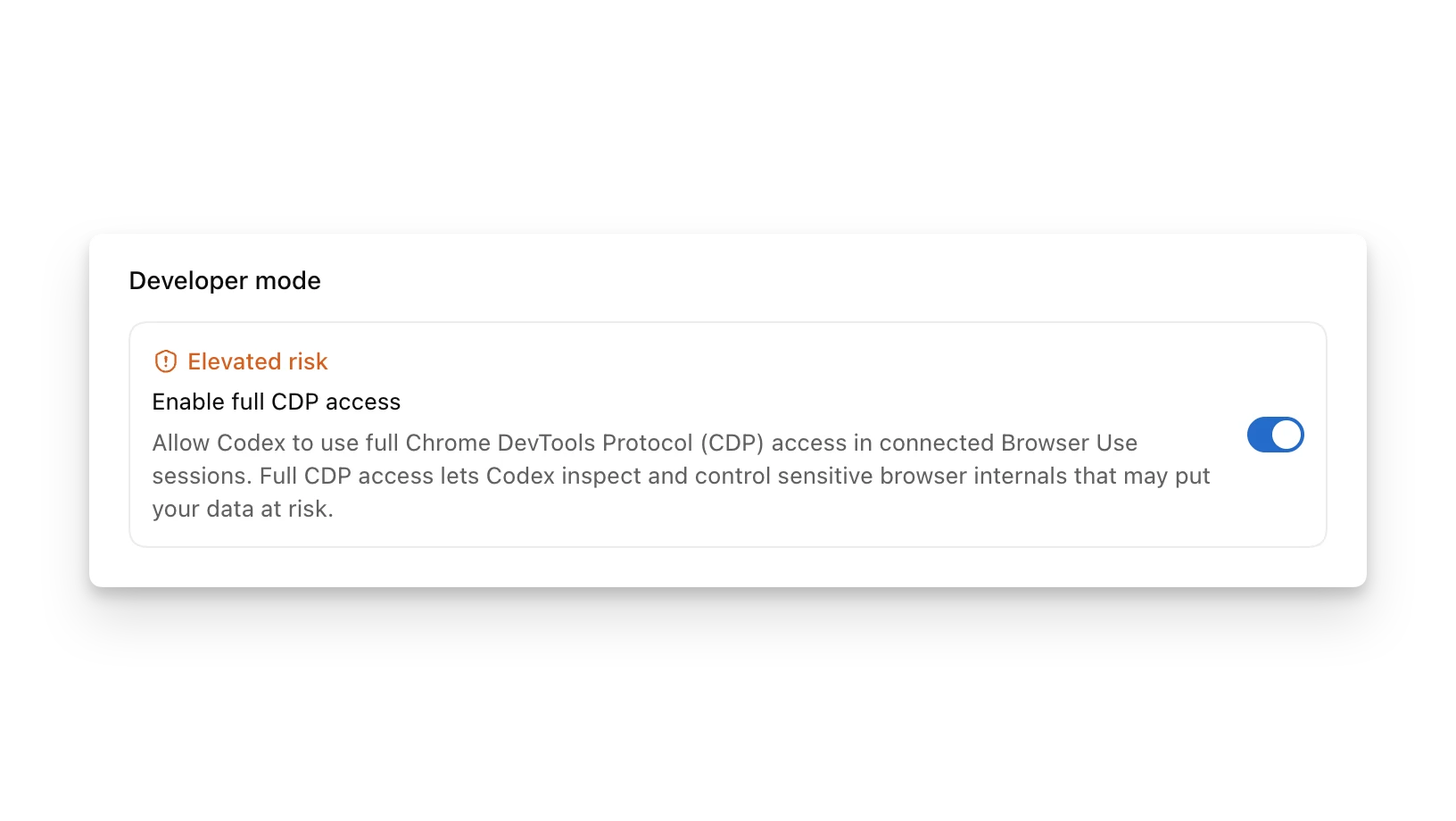
Browser Developer Mode can enable deeper Chrome DevTools Protocol access for profiling and debugging, subject to workspace policy.
5. First-Run Workflow
1. Start at the repository root:
```bash
codex
```
2. Ask Codex to inspect the project before editing:
```text
Read this repository structure. Identify the build, test, lint commands, main source folders, and project conventions. Do not edit files yet.
```
3. Create or improve AGENTS.md:
```text
Generate an AGENTS.md for this repository. Include setup commands, tests, linting, coding conventions, review expectations, and done criteria.
```
4. Start with a small, verifiable task:
```text
Fix this failing test without changing the public API. After the fix, run the smallest relevant test and report the command and result.
```
5. Review the diff:
```text
/review
```
6. Prompting That Works
A strong Codex prompt usually includes four things:
- Goal: what should change or be built.
- Context: files, folders, logs, screenshots, examples, or errors.
- Constraints: APIs, architecture, security rules, compatibility, dependency limits, or style.
- Done criteria: tests pass, bug no longer reproduces, screenshot matches, or behavior is verified.
Template:
Goal:
<What you want changed>

Context:
- Files: @src/foo.ts @src/foo.test.ts
- Current behavior: ...
- Related example: ...

Constraints:
- Do not change the public API
- Reuse existing helpers
- Do not add dependencies unless you explain why first

Done when:
- Add or update tests
- Run <specific command>
- Summarize changes and verification
For complex work, start with Plan mode:
/plan Investigate the authentication flow and propose a migration plan. Do not edit files yet.
When the requirement is fuzzy, ask Codex to interview you first:
I have a vague idea for improving dashboard performance. Ask me the key questions needed to define scope, metrics, and acceptance criteria before writing code.
7. Threads, Context, Plan Mode, and Goal Mode
A thread is one continuous Codex session: prompts, model output, file reads, edits, commands, approvals, and follow-ups. Keep related work in one thread, but avoid running two threads that edit the same files at the same time.
Local threads run on your machine. Cloud threads run in isolated cloud environments and are useful for async or parallel work.
Codex manages a model context window. Long tasks may be compacted automatically, and you can use /compact to summarize old context.
Use Plan mode when the task is ambiguous or high risk:
/plan Propose the implementation steps and verification strategy. Do not modify files yet.
Use Goal mode for longer work:
/goal Migrate this project to TypeScript. The app should compile in strict mode without explicit any types.
Good goals are specific and measurable.
8. Approvals, Sandboxing, and Security
Codex safety is controlled by two layers:
- Sandbox mode: what Codex can technically access or modify.
- Approval policy: when Codex must pause and ask.
Common sandbox modes:
| Mode | Behavior | Use case |
|---|---|---|
read-only | Inspect files without automatic edits | Research and review |
workspace-write | Read and edit inside the workspace | Default local development |
danger-full-access | No sandbox boundary | Only in externally isolated trusted environments |
Common approval policies:
| Policy | Behavior | Use case |
|---|---|---|
untrusted | Ask before commands outside the trusted set | More cautious runs |
on-request | Work inside sandbox, ask when crossing boundaries | Interactive development |
never | Do not ask for approvals | Non-interactive automation with safe constraints |
Recommended local default:
codex --sandbox workspace-write --ask-for-approval on-request
Read-only investigation:
codex --sandbox read-only --ask-for-approval on-request
Network access for commands is normally separate from web search. Enable command network access only when needed:
[sandbox_workspace_write]
network_access = true
9. Configuration
User configuration lives at:
~/.codex/config.toml
Project configuration can live at:
.codex/config.toml
Project config loads only for trusted projects. Precedence is:
1. CLI flags and --config.
2. Project .codex/config.toml, closest wins.
3. Selected profile file.
4. User ~/.codex/config.toml.
5. System config.
6. Built-in defaults.
Common settings:
model = "gpt-5.6"
model_reasoning_effort = "high"
approval_policy = "on-request"
sandbox_mode = "workspace-write"
web_search = "cached"

[sandbox_workspace_write]
network_access = false

[features]
multi_agent = true
hooks = true
fast_mode = true
One-off overrides:
codex --model gpt-5.6
codex -c model='"gpt-5.6"'
codex -c sandbox_workspace_write.network_access=true
10. Models and Reasoning
The current Codex configuration documentation uses gpt-5.6 in its example. OpenAI's current platform latest-model resolver returns gpt-5.6-sol, but that does not mean every Codex surface or account can select that exact platform model. Use the model picker or /model to confirm the models available to your account before setting a persistent configuration. The August 31, 2026 retirement notice applies to gpt-5.4 and gpt-5.4-mini for ChatGPT-authenticated Codex users; migrate saved settings to gpt-5.6-terra and gpt-5.6-luna respectively, then verify workspace availability.
General guidance:
| Task | Suggested setup |
|---|---|
| Complex debugging, review, or migration | Use the strongest coding model available in your Codex selector with high reasoning |
| Normal implementation and tests | Start with gpt-5.6 where it is available; use medium or high reasoning as task complexity requires |
| Fast exploration or supporting subagents | Choose an account-available lower-latency model and keep the task narrow |
| Time-sensitive model choice | Recheck the live model selector and official model guidance; names and entitlements change |
Fast mode can increase speed at higher credit consumption:
/fast on
/fast off
/fast status
11. Codex App Tips
Use Codex App when you want visual workflows:
- Local threads edit the current project.
- Worktree threads isolate changes in a Git worktree.
- Cloud threads run remotely.
- The diff pane supports review, comments, staging, reverting, committing, pushing, and pull request creation.
- The integrated terminal lets you run tests and development servers.
- The in-app browser previews local pages and supports browser comments.
- Computer Use can operate desktop apps with approval boundaries.
For front-end work, keep a floating Codex thread next to the browser or preview window and iterate with visual feedback.
12. Codex CLI Tips
Start interactive mode:
codex
codex "Explain this codebase to me"
Resume work:
codex resume
codex resume --last
codex resume --all
codex resume <SESSION_ID>
Run a one-shot task:
codex exec "fix the CI failure"
Attach images:
codex -i screenshot.png "Explain this error"
codex --image img1.png,img2.jpg "Summarize these diagrams"
Useful slash commands:
| Command | Purpose |
|---|---|
/permissions | Change permission mode |
/model | Change model and reasoning |
/plan | Plan before editing |
/goal | Set or manage a long-running goal |
/review | Review the current diff |
/diff | Show Git diff |
/mention | Attach files or folders |
/mcp | List MCP tools |
/skills | Use a skill |
/compact | Summarize context |
/status | Inspect session state |
13. IDE Extension Tips
The IDE Extension works well when your editor context matters. It can use open files, selected ranges, and @file references.
Example:
Use @example.tsx as a reference to add a new page named Resources.
If Codex seems to miss the current file, check IDE context or explicitly mention the file.
14. Cloud, GitHub, Slack, and Linear
Codex Cloud is useful for long-running or parallel tasks. It requires a configured cloud environment and a GitHub repository.
CLI:
codex cloud
codex cloud exec --env ENV_ID "Summarize open bugs"
GitHub PR review:
@codex review
Ask Codex to fix a finding:
@codex fix the P1 issue
Slack and Linear can start cloud tasks from comments or threads when their connectors are configured.
15. AGENTS.md
AGENTS.md is durable guidance for Codex. Use it for repository-specific commands, conventions, review expectations, and verification steps.
Good contents:
- Repository layout.
- Install, build, test, lint commands.
- Coding style.
- Pull request expectations.
- Security constraints.
- Done criteria.
Example:
# AGENTS.md

## Repository expectations

- Use pnpm, not npm.
- Run `pnpm typecheck` after TypeScript changes.
- Do not change public APIs unless explicitly requested.
- Explain before adding production dependencies.

## Review guidelines

- Prioritize correctness, security, regressions, and missing tests.
- Do not raise style-only comments as high-priority findings.
When Codex repeats the same mistake, ask for a retrospective and update AGENTS.md.
16. Skills, Plugins, MCP, Hooks, and Rules
Skills package reusable task workflows:
$skill-creator
Use Skills for repeated workflows such as document generation, security scanning, framework migrations, or release checks.
Plugins are installable bundles that can include skills, MCP configuration, hooks, app mappings, and assets:
$plugin-creator
MCP connects Codex to external tools and private context:
[mcp_servers.context7]
command = "npx"
args = ["-y", "@upstash/context7-mcp"]
HTTP MCP server:
[mcp_servers.figma]
url = "https://mcp.figma.com/mcp"
bearer_token_env_var = "FIGMA_OAUTH_TOKEN"
Hooks run lifecycle checks around tool use. Rules can allow, prompt, or forbid command prefixes outside the sandbox. Use them for repeatable safety and team policy.
17. Automations and Subagents
Automations are scheduled checks, reminders, monitors, or recurring follow-ups. Use thread automations when future runs depend on the same conversation context.
Subagents help parallelize read-heavy work:
Review this branch with parallel subagents. Spawn one agent for security risks, one for correctness regressions, and one for test gaps. Wait for all three, then summarize findings with file references.
Subagents use more tokens. They are best for exploration, triage, review, and summarization. Be careful with parallel write-heavy workflows.
18. Windows Notes
Codex supports Windows through the native Codex App, CLI, IDE Extension, and WSL2.
Recommended native Windows sandbox:
[windows]
sandbox = "elevated"
Fallback:
[windows]
sandbox = "unelevated"
Use WSL2 when your toolchain is Linux-native. Keep repositories under the WSL home directory for better performance:
mkdir -p ~/code
cd ~/code
If the Windows sandbox cannot read a directory:
/sandbox-add-read-dir C:\absolute\directory\path
19. Prompt Templates
Feature work:
Goal:
Implement <feature>.

Context:
- Entry files: @...
- Similar implementation: @...
- Requirements: ...

Constraints:
- Reuse existing components and helpers
- Do not change public APIs
- Do not add dependencies unless you explain why first

Done when:
- Add or update tests
- Run <command>
- Summarize changes and verification
Debugging:
Problem:
<behavior>

Reproduction:
1. ...
2. ...

Error/log:
<paste error>
Constraints:
- ...

Find the root cause first, then make the smallest safe fix and rerun the relevant check.
Review:
Review the current diff. Prioritize correctness, security, regressions, and missing tests. Report findings by severity with file and line references. If there are no issues, say that clearly and list any remaining test gaps.
20. Troubleshooting
Codex missed the right files:
- Start from the repository root.
- Mention files with
@or/mention. - Check IDE context.
- Confirm the App project points at the right folder.
Codex is going in the wrong direction:
- Ask it to restate the goal and constraints.
- Switch to
/plan. - Give examples of what to follow.
- Narrow the task.
Commands fail:
- Check sandbox mode.
- Check network access.
- Check working directory.
- Check missing dependencies.
- Check approval policy.
MCP tools are unavailable:
- Verify
config.toml. - Confirm OAuth login.
- Check environment variables and shell environment policy.
- Confirm
enabled_tools/disabled_tools. - Restart Codex after config changes.
21. Official Sources
- Codex overview
- Codex prompting
- Codex workflows
- Best practices
- Agent approvals and security
- Sandboxing
- Config basics
- Advanced configuration
- Codex models
- Codex CLI
- CLI slash commands
- Codex App
- Codex app features
- Codex IDE extension
- AGENTS.md guide
- Agent Skills
- Plugins
- Build plugins
- Model Context Protocol
- Rules
- Codex changelog
- Codex app server
- Codex Security CLI
- Codex Security TypeScript SDK
- Hooks
- Subagents
- Windows
- Latest-model guidance
Refresh scope: checked August 5, 2026, including the July 27-31 update window. The examples in this guide use current documented configuration names, but live availability, limits, pricing, previews, and model choices must be confirmed in the official product surface for the relevant account.